Stylin' (Other Sites) Too
Back in February, I wrote about some small hacks to make this site look less cookiecutter. I still have some plans for improving that look, but in the mean time, I've been applying my CSS to something else: Other people's design decisions.
In recent weeks, I've been using the Vivaldi browser more and more1. Inspired by blogs like the one by Nicolas Magand, I've been trying to see if sticking to some default MacOs Applications is better than gallivanting about, looking for a new hit–which are less likely, now that even native GUIs have gone completely bonkers.
Safari also is quite well integrated in the OS–but what it definitely lacks, are extensions. And no, not to make things all fancy-like, but to restore some sanity to the friggin' interwebs.
Is everyone taking crazy pills? #
Take YouTube for example. I actually bought a Safari extension to alleviate my pains here, but just ad-blocking and making the player a bit more "normal" doesn't seem to be enough.
So given that Vivaldi gives me access to the Chromified spectrum of extensions, I'm currently using three to make watching videos somewhat livable:
- uBlock Origin to block the regular ads.2
- Sponsorblock to remove the annoying sponsor segments from videos. I know about NordVPN. I don't care.
- Unhook to remove all the new "features": Forcing a "mix" on me whenever I click on a music video, useless or worse recommendations, and lately also all the comments.
It's actually quite decent with this. I still have to turn off forced automated translation too often, but I'm actually enjoying my time on the site again3
Rolling your own #
But of course, not every site is as popular and pervasive in its annoyances to spawn so many extensions that remove features.
My answer to this: User styles.
Adding styles on top of other styles is why the C in CSS stands for "Cascading". But did you know that doesn't just mean that site owners can layer on more and more customizations (like my add-ons to this very blog)?
Given that this is already built in to every browser, it's easy to benefit from this, you just have to tell the browser where to look in addition to the places the web page is telling you.
Even old Safari can do this:
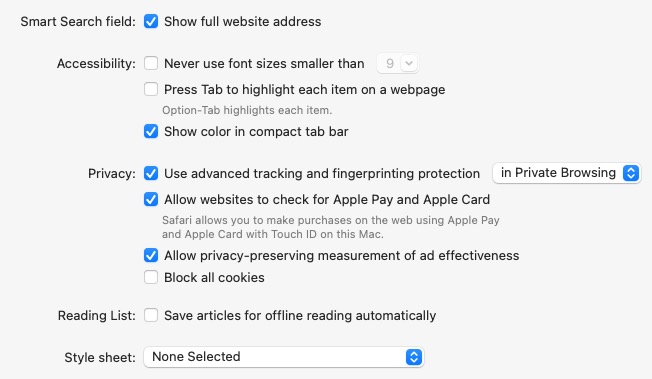
The problem is that either you're going to the configuration all the time, or you'll have to put everything into one style sheet. This isn't very sustainable, can lead to conflicts and every site has to load it4.
In came Stylish, and extension for Mozilla/Firefox released in 2005, and then ported to almost every other browser under the sun. Apparently it accumulated some bad commercial features, and thus was replaced by the Stylus fork, which I'm using.
Now, 2005 is quite a while ago, and you notice it when you're browsing pre-made customization on sites like userstyles.org. Quite often the styles aren't for the current version of the web site. There are a lot of custom dark mode versions for sites that added their own version of this hilariously badwrong idea in recent years anyways.
So I've mostly been writing my own.
Let me show you some examples to illustrate how you can still bend the web to your own wicked taste.
Mastodon #
I'm back on using Mastodon as my primary chatty social media experience. But there's not really a good native client, so I tried customizing one of the webby ones.
As it already had some good defaults and added features, I've chosen Phanpy.
Remove boosts #
I've noticed that even the people I follow who have somewhat decent post etiquette forward (or "boost" in Mastodon terms) a lot of sketchy and/or annoying takes. Turning off boosts has been a godsend to my mental health. The official Mastodon client offers this as a feature, Phanpy doesn't. For this, you could use uBlock, which is perfectly fine for just removing bits and pieces, but while we're creating some user styles anyways:
1li.timeline-item-carousel {
2    display: none;
3}
4
5li:has(> a > .status-reblog) {
6    display: none;
7}
This is the typical usage for writing user styles: You use the browser developer tools to find which elements bothers you, then add styles to fix it, or in this case, remove it.
I've got two styles here, as phanpy is supposed to collect boots in a "carousel", but sometimes single items get through.
The second pattern also shows that you have to get tricky with CSS. I want to hide a list item that doesn't have a particular CSS class itself, but one of the children elements does (if I just hide this child, ugly remnants of the parents, like borders will remain).
li:has(> a > .status-reblog) means that the <li> list item element is affected, but only if it has an <a> tag that in turn has something with a status-reblog class.
Phew.
Change fonts #
This is a very common pattern for me, and phanpy being a read-heavy experience is a good example.
 1    html,
 2    body {
 3        font-family: Saxony Pro, Helvetica Neue, Perun, ui-sans-serif, system-ui, sans-serif, "Apple Color Emoji", "Segoe UI Emoji", "Segoe UI Symbol", "Noto Color Emoji" !important;
 4    }
 5
 6    .status .content p {
 7        text-wrap: stable;
 8        hyphens: auto;
 9        max-width: 68ch;
10    }
Look at that huge font list. I basically copied the original, and then you see the traces of me experimenting with some favorite fonts:
- Perun is modeled after one of my favorite font families, Univers. Doesn't have the wide variety and quality of the original, but it's free. Everyone seems to clone Helvetica, but poor Univers…
- Speaking of everyone's second-favorite font, Helvetica makes an appearance in one of its more modern incarnations. It was okay.
- I'm currently using Saxony Pro, a clone of the pretty great Syntax typeface.
The second block is also quite common in my modifications, making a common text block narrower and improving justification and wrapping.
Grüezi #
Phanpy has a lot of rounded corners and gradients, which I thought had gone the way of the ever-changing web fashion a while ago.
Here I applied an insane amount of individual rules to remove this, and as I needed some rough replacement design, I went with one of my old favorites: Swiss Design.
So it's more blocky and red now.
After a couple dozen of lines, I moved from this:
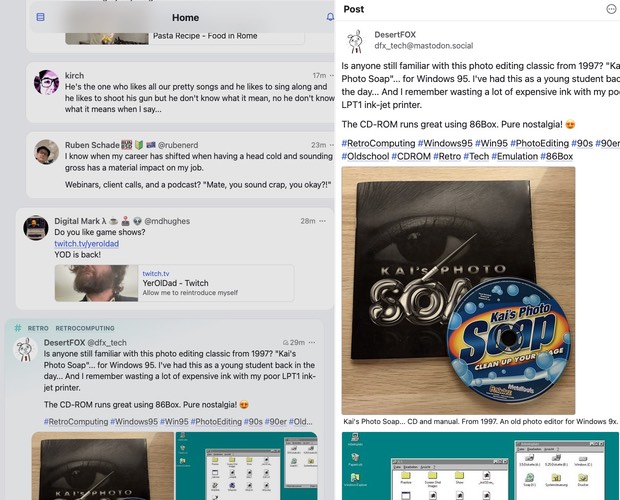
to this
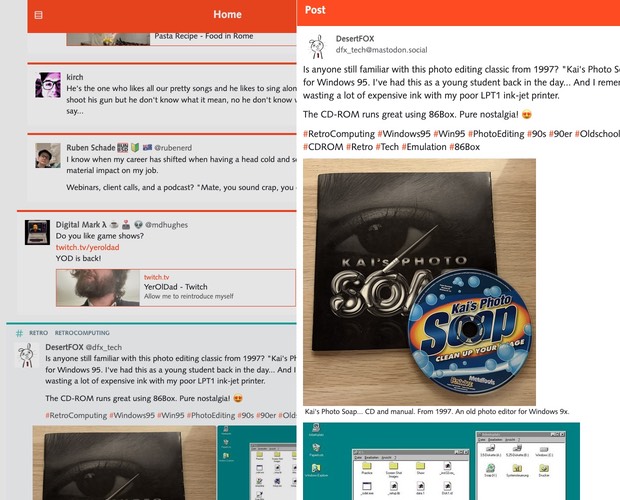
I quite like it. I can still determine whether I see a post because I follow a user or a hashtag quickly, but there's a lot less mid-10s graphic design in there.
Lobsters #
I used to hang around on several "news aggregators", but they either vanished (I mean, technically slashdot is still around, but…), went a bit too edgelordy or industry-friendly (the "orange site" being a prime example).
But lobste.rs seems quite okay so far, and after years, someone finally invited me, giving me the ability to do what I mostly use accounts for: Not posting, but hiding site features–in regular old-school internet fora that mostly meant the ugly and distracting "signatures" of posts, with lobste.rs it's posts with certain tags (e.g. anything "vibecoding").
But there's always room for improvement, so…
Readability #
This is another example of my most common customizations regarding font types, sizes, paragraphs etc.
1body,
2textarea,
3input,
4button {
5    font-family: Optima, arial, sans-serif;
6    color: var(--color-fg);
7    line-height: 1.5em;
8    font-size: 18px;
9}
Here you can see that after a short attempt at everyone's least favorite Helvetica clone, I went with another one of my favorites, Optima5. Line-height and font-size are a bit larger, so I don't need to zoom in (that's one of the few annoying things about Vivaldi, it doesn't remember zoom settings per site).
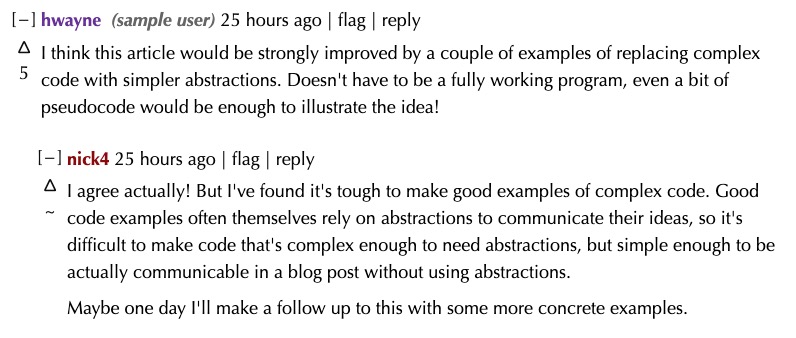
Highlight users #
There's one other feature you can see in the screenshot. I used to frequent the old news aggregator and toxic dump "fark" in my younger years, and while its web design seems straight from the bottom end of the millennium, it does have one neat feature: You can add a note to every users name (I've got one tagged as "Chris Christie Impersonator" for a now unknown reason), and color their posts in a certain manner.
There were times when I wished for an extension for this, but some styles are the second best solution to this:
 1.byline a[href*="/~hwayne"]::after {
 2    color: #666;
 3    font-style: italic;
 4    margin-left: 0.25em;
 5}
 6.byline a[href*="/~hwayne"]::after {
 7    content: " (sample user)";
 8}
 9.byline a[href*="/~hwayne"] {
10    color: rebeccapurple !important;
11}
This adds a comment to a user and changes their color. It's split into three rules, as my real code applies the same rules to a few other users, too. Everyone gets the basic italics & margin style, the content/comment is different for everyone, and some users also get the same coloring.
Time well spent? #
I've added modifications like these to a lot of sites I vist regularly during the last few weeks, and so one might ask whether all that time was worth it.
For some subset of this, I had some common bookmarklets to sanitize formatting, then there's of course the site zoom or the reader mode of the browser.
I'd say that the more fine-tuned results are more readable, but more importantly: I get a feeling of control over my browsing experience.
I've been missing that a lot when it comes to the internet6 recently, and this puts me in control, to a degree I decide.
-
It's not open source, but neither is Safari, and the developer's sentiments seem quite fine. If I ever manage to get back into the warm, albeit increasingly sloppy arms of Linux or one of the BSDs, I'll give one of the Foxes another try. ↩︎
-
That's one of the sentiments I'm talking about, as far as I know Vivaldi intends to keep the more powerful Chrome extension mechanics alive. ↩︎
-
Maybe even enough to subscribe to the 'Tube. Would be weird, if blocking most of the experience "sells" me on the site. ↩︎
-
Having said that, Mark Hughes has a well curated stylesheet just for blocking comments on his site. ↩︎
-
My font has a copyright from 1993, as I got it from an old Ventura Publisher for Windows 3.11 CD. ↩︎
-
Or, well, anything. ↩︎